Apple's recent letter, sent to threaten a local Victoria school over a trademark dispute, shows just how big corporate nets can be. Fortunately, for bloggers, they can now purchase libel insurance. The only downside, as with all insurance, is the cost of the premiums, which start at $500; however, this product not only legitimizes the blogging world, but also offers protection in it. (At what cost is the only question you must answer). Another similar move toward wider Internet distribution is CBS's decision to show archived content on YouTube. If you wish to watch a number of news broadcasts you can check out LiveStation, which regularly adds networks to its service. (Not all stations are available in every country, but it's a free service).
A very clever new book, worthy of occupying a spot next to the Geist Atlas, is The Grim Reaper's Road Map: An atlas of mortality in Britain. This tome maps how people died; that is, for each cause of death, the number of deaths is represented by a shade of colour. Thus, at a glance, you can determine in which neighbourhood (1,282 total) people are more likely to die of a heart attack or under the blade of a knife.
Technology progresses so fast that many cannot catch up. For instance, the other day I was trying to explain the reasoning behind having 7000 songs on my iPod to a Luddite. In the end she said she was happy with her Walkman, or was it a Discman; however, she did dig my passion for music. She also liked the fact that you could play any song that came to mind instantly, match your mood to music, and be a DJ. For her, it was the task of organising them and the responsibility of listening to so much music frightened her. You got to respect that; I do spend quite a bit of time getting and organizing music. Although Pandora Radio, Last FM, and playlist makers help, iTunes on the computer (rather than the iPod) remains much more functional and intuitive, especially with Genius.
The Asus Eee PC has just won the Hardware of the Year Award. Last year the Eee PC made quite a stir in the news prior to its release due to its small size, full functionality and low price, and it deserves the award. The newer models, which won the award, have larger screens and more memory than the first release. I bought a 701 for my wife near the time of its release last fall. I was impressed with the machine right away for its quickness and good design. Unfortunately, connecting to a WPA encrypted wireless network proved troublesome. I resolved the issue by following the excellent tutorial in the forums and wiki, but this turned out to be a temporary fix and the connection was never robust. After giving up for a while, it turned out that the Eee PC may not have been the culprit after all. The DSL connection on my AP was frequently dropping off, and, after some frustrating phone calls to Telus, a technician came over to my house. He turned out to be great, and made a number of changes to my phone system that made my connection robust. After these changes were made the Asus Wi-Fi worked with WPA, but only for a week.
Rather than screwing around with the default Xandros any more, I opted to live-boot Puppeee. The tutorials were helpful, but they missed some steps that caused me grief. Live-booting allows you to boot the operating system from a disk; as a result, you can boot a distribution, such as Puppeee, without affecting your default OS (in this case, Xandros). The first step is to download the ISO, or disc image, for the operating system. Then, check the fingerprint of the file with md5sum (good instructions here). Now you're ready to burn the ISO to disc; I used Infra Recorder and followed these instructions. Once you have a CD you can plug in your USB CD Drive to the Eee or xcopy the image to a USB flash drive, no programs seemed to do this directly. Once Puppeee is booted from the CD (if it doesn't, change the boot order in the BIOS) you can make a portable version on a Flash drive or card. To do this you need to mount the CD drive by clicking on the drive icon on the desktop and clicking on the CD drive; then, click on Home>Setup>Puppy universal installer and follow the recommended instructions. Once it is installed you shut down the computer and unplug the CD drive; then press the power button and press Esc when the Eee screen appears to select the boot device. Select a boot device (USB drive) and you're all set. Puppeee has handled the wireless encryption without incident and I'm once again marvelling at the Eee PC's greatness. Once you've cut your teeth on this, trying other distributions is a synch, although some may require a larger flash drive. I used a 2 Gb drive, but Ubuntu and Mandriva require more (you can purchase Mandriva on an 8 Gb flash drive for $80).
Science Fiction provides much of the myth for our hi-tech world; it has opened our horizons and suggested the pinnacles that we may reach. Although we have yet to reach the level of convenience and humanity portrayed in The Jetsons and Star Trek, Science Fiction continues to bring us hope (Kurzweil's Singularity). Nevertheless it has also brought us disillusionment (Where's My Jetpack) and fear (Terminator).
Science Fiction interprets the dichotomy of technology: progress AND destruction. No where is this more clear, now the threat of Armageddon in the Cold War has faded, than in climate change: the drive for faster better has technology = resources = production = pollution , yet the hope of the future lies in technology. However, it is unclear to what degree:
MTV Switch has also just released another great video, also produced by 180 Amsterdam. Talk of geo-engineering evokes a similar response (see Wired's recent article Ken Caldeira). Ironically discarded technology continues to pile up and create a hazard for those in Africa and China. There is some hope, however, such as the introduction of the RoHS (Restriction of Hazardous Substances). Meanwhile possibilites will remain just that unless common sense pervades our culture of greed. Will technology lead to a better world or a more inequal one? It's up to us.
Recently, I passed through the gateway of another "monumental" birthday; however, given the fact that I'm usually happy and only randomly glum, comments like, "focus on the happy and not the birthday," bore little relevance to me. Instead, I decided that it was high-time that I modded my PSP. I did so for a number of reasons: first, I seek perfection in a machine and having my music cut out whenever I surf the net, viewed a photo, or played a game irritated me; second, the noise and load times of the UMD drove me crazy. To solve these problems I turned to the world of Dark Alex and other modders. Sony has made some welcome changes to the firmware, the PSP operating system, but has focussed much of its energy on combatting these hackers and providing impractical offerings, such as a camera and GPS (both require bulky attachments). Although my Slim and Lite is an object of beauty, especially with a GelaSkins on it, Sony continues to be an unyielding protectionist: think of the Memory Stick, BlueRay, ATRAC. Sony would do well in this case to abandon the UMD and offer all games for download (get with the times) and acknowledge the power of open-source, or at least other options, e.g. flash memory or .mp3.
The first step in hacking your PSP is to create a Magic Memory Stick; xMESxINCx provides a good video on how to do this, although it's interrupted by a phone call, and a link to the necessary software. Basically you download software and run it with your PSP in USB mode. Ensure you use a Memory Stick over 256 mb that is backed up, since it will be formatted. The next step is to make a Pandora Battery. PSP batteries have a circuit board with an EEPROM chip, which when disconnected becomes a recovery battery. If you have access to a modified PSP you can easily convert your battery into a Pandora Battery with the creator program or you can purchase a modified battery. A common belief is that once the Pandora Battery is made the battery can only be used as a recovery battery; however, this is false, so it is unnecessary to purchase a new battery for modification. If, for some reason, you do decide to purchase a new battery, know that Sony has recalled older batteries and replaced them with batteries that cannot be turned into Pandora Batteries (yet).
The first step is to open the battery's case; however, be very careful: first, more force than you think is necessary to cut the case with a knife (I tested how much was necessary on a piece of plastic from a yogurt container, which has roughly the same thickness; second, if the battery is punctured is will pour forth smoke and catch on fire. I found this out the hard way on my first attempt on an old Extended Life Battery. I was lulled into a false sense of complacency by YouTube videos that didn't show the case-opening process. The result was that I attempted to open the case at 3:00 a.m. after a string of nights with no sleep while watching TV, stupid I know. Anyway I punctured the battery inside the case and had a lovely spectacle of smoke and fireworks. No harm was done, but my den reeked for a few days. Armandolora94 seems to be the only video that shows how much effort is required to open the battery's case. Keep your cool and you won't hurt your finger like him or say screw it and use a sharp knife once the case was partially opened like me.
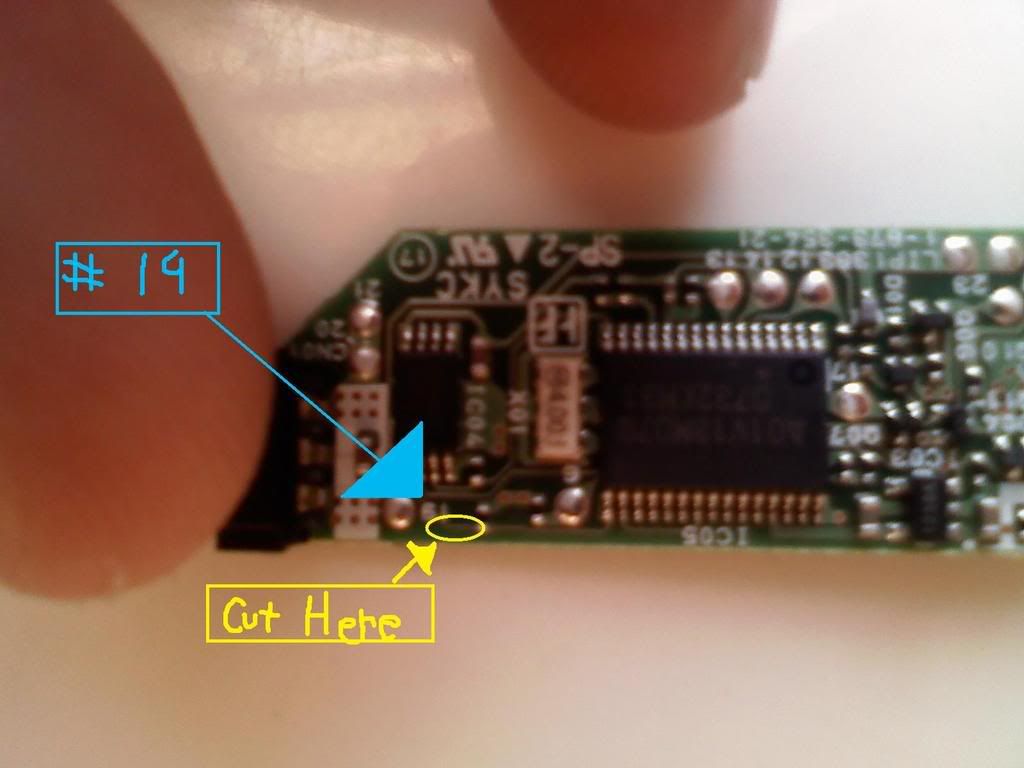
Once the case is open you open out the circuit board then cut the wire in the bottom left below the 1 or 9. xMESxINCx have the best video showing every step and a picture of where to cut. Once you have your Magic Memory Stick and Pandora Battery you return to the instructions on the first xMESxINCx (Magic Memory Stick) video. Once this process is done you repair the Pandora battery by filling in the cut you made with graphite from a pencil and you're done. You now have the 3.72 m33 custom firm ware (CFM) installed and can play ISO or CSO games, games taken off a UMD. To do so, press Select and you will see a "M33 VSH Menu"; toggle down to device and select "UMD Disc" by pressing the right or left arrows on the DPad. Then exit and go into USB Mode. Then go into Windows Explorer (My Computer) and select your PSP drive letter; you will then see an .iso file. Copy this file to your computer and you have an ISO game. When you're done making .isos switch the UMD Disc back to "Memory Stick".
Since many new games have large files it is best to compress them. Do this by downloading a CSO Compressor; I really like YACC (Yet Another Cso Compressor). Besides the cool name, it is really easy to use (select file locations and press "Go"). Once you have a .cso file, copy it to the ISO folder on the root of your Memory Stick (I kept the Magic Memory Stick as it was in case my PSP ever bricks and used another for my games, etc ...); if the folder is not there just create it. Then open the VSH Menu (Select) and choose "M33 driver" under "UMD ISO Mode" and you're ready to play (go to Game on the XMB and choose "Memory Stick" and select your game).
To play music while playing a game, looking at pictures, or surfing the Net, you need to install the Music PRX plug-in. The instructions for install are easy, follow the readme: if there isn't a seplugins folder on your Memory Stick just copy the one you've downloaded; if there is one edit the game and vsh folders in your seplugins folder. Then use the commands (Note plus Start to stop/start, etc ...) to control your music. If it doesn't work you may need to enable the plug-ins: go to the Recovery Menu (Turn your PSP off and hold the button for 7 seconds or so until the on light turns off; then hold the R-Trigger and turn your PSP on). Once in the Recovery Menu go to plug-ins and enable the music.prx plug-ins. In the Recovery Menu you can also set your PSP to charge whenever a USB cable is plugged in (Configuration > Charge battery ...). Exit the Recovery Menu and your PSP will boot up.
In order to update your PSP you will need to go to Dark Alex. Once there select the latest custom firmware and install it according to the directions. Once a version higher than 3.90 m33-2 is installed you can update the CFM via the update utility on the PSP. Enjoy the new capabilities of your PSP.
Chris Anderson in The End of Theory proclaims that science, specifically the model which is based on hypothesis and experimentation, has been rendered unnecessary by the abundance of available data. In other words, if you want something, look it up; don't theorize. Nevertheless, science rests on thought; as a result, although answers wait amidst the petabytes, someone must ask the question. Thus, only experimentation diminishes, although data must still be manipulated. In effect, the change proposed by Chris Anderson regularly occurs. Scientists have determined that Caesar invaded Britain 4 days earlier than previously thought based on astronomical data. Similarly, though in my opinion with much less certainty, scholars have announced that Odysseus slaughtered the suitorson April 16, 1178 BC. Precise dates, such as this one, are unheard of in Homeric scholarship. The dispute over the date of the Capitoline Wolf is making the news again, although there's no data set to solve this one. Imagine the number of textbooks that will have to be changed. Scientists have also been extracting the charred Herculaneum scrolls with impressive results.

 Apple's recent letter, sent to threaten a local Victoria school over a trademark dispute, shows just how big corporate nets can be. Fortunately, for bloggers, they can now purchase libel insurance. The only downside, as with all insurance, is the cost of the premiums, which start at $500; however, this product not only legitimizes the blogging world, but also offers protection in it. (At what cost is the only question you must answer). Another similar move toward wider Internet distribution is CBS's decision to show archived content on YouTube. If you wish to watch a number of news broadcasts you can check out LiveStation, which regularly adds networks to its service. (Not all stations are available in every country, but it's a free service).